Genealogy Software and Cemetery Transcriptions Logo
OVS-Genealogy -- CemEditor Help
www.ovs-genealogy.com

Refresh your browser to insure up-to-date help files.

Categories

Home
Cemetery Surveys
Church Records
Transcription Software

HELP

Frequently Asked Questions
Download Updates
Installation Help
Getting Started
Convert Ver 1 to Ver 2
Step-by-step instructions
Publisher Registration
Excel Templates and Formulas
Edit & Add Data
Cemetery Info
Select Image File / Photos
Importing Data
Exporting Data
Renaming Photos
Encrypting Photos
Protecting Data Files
Publish-Tag-File
File Location
Publish to CD

Search

Surnames, cemeteries, etc

OTHER

General FAQs
Downloads
Contact Us
Links/Submit Link

Help

Getting Started - Loading the publisher Registration File

ONE MORE IMPORTANT STEP. ( You only need to do this once)

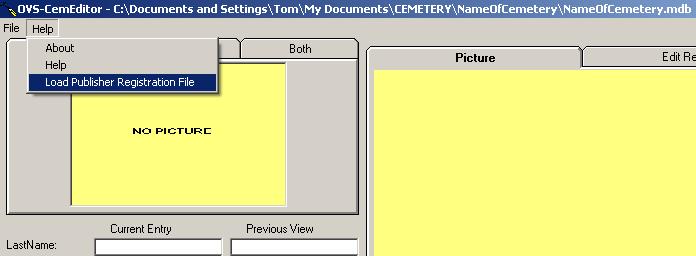
From the CemEditor main menu -- Click on Help-"Load Publisher Registration File"
See Partial Screen Shot
Click here to open registration file

This is your software license file and the file is located on your CD and should be named "Your Name.lin" Click on "Open". This file may also be emailed to you.

Your software is now fully registered and ready to use.

(c) 2004-2008 OVS-GENEALOGY TAG Contact: support@ovs-genealogy.com

To receive replies make sure to allow email from this address in your email filter

www.ovs-genealogy.com