Genealogy Software and Cemetery Transcriptions Logo
OVS-Genealogy -- CemEditor Help
www.ovs-genealogy.com

Refresh your browser to insure up-to-date help files.

Categories

Home
Cemetery Surveys
Church Records
Transcription Software

HELP

Frequently Asked Questions
Download Updates
Installation Help
Getting Started
Convert Ver 1 to Ver 2
Step-by-step instructions
Publisher Registration
Excel Templates and Formulas
Edit & Add Data
Cemetery Info
Select Image File / Photos
Importing Data
Exporting Data
Renaming Photos
Encrypting Photos
Protecting Data Files
Publish-Tag-File
File Location
Publish to CD

Search

Surnames, cemeteries, etc

OTHER

General FAQs
Downloads
Contact Us
Links/Submit Link

Topics

Installing the software

Place your CD in the CD-Drive. It should automatically start installing the software. You can also start the setup program by Clicking on START, then RUN, then type "d:/CEM-EDITOR-SETUP/setup.exe"

    Once the main program has been setup:
  • Go to your My Documents folder
  • Create a new folder called "CEMETERY" or another name if you prefer
  • Click on the "CEMETERY" Folder you have just created to open it.
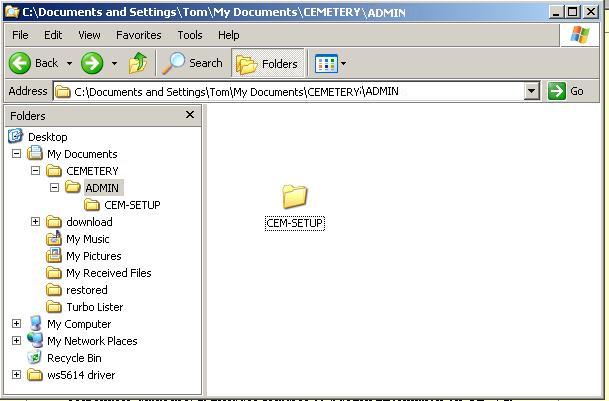
  • (OPTIONAL)Make a new folder named "ADMIN"
  • (OPTIONAL)Now copy the folder from the CD named "CEM-VIEW-SETUP" to the "ADMIN" folder(These are the setup files you will distribute)

After these steps it will look similar to this screen shot. cem-edit-installation-view-1 (36K)

This completes the installation of your new software. If you want to also install the CemViewer software at the time simply Click on the CEM-VIEW-SETUP folder and click on Setup.exe.

Receiving an error during installation? See installation troubleshooting.

(c) 2004-2008 OVS-GENEALOGY TAG Contact: support@ovs-genealogy.com

To receive replies make sure to allow email from this address in your email filter

www.ovs-genealogy.com