 |
|
|
|
CemEditorCemetery Transcription Software* Easy to use. * Accurate Transcriptions *Free Technical support
Version 3Previous -- Version 2.xx information. Cemetery Editing, Management and Cemetery Transcription SoftwareCemetery Transcription Software help. CemEditor3 has many new improvements including 3 new entry fields, faster importing, and an ability to export directly to sqlite. The CemEditor is designed for individuals searching their ancestry, family historians, groups, genealogy and historical societies, cemeteries and other organizations desiring to organize a cemetery transcription. It will provide a very useful searchable database when complete. It also works great to combine and manage all family cemetery pictures in one convenient package. Add this Cemetery Information Management software to your family tree and genealogy software collection. The CemEditor3 software easily organizes and manages cemetery photos and transcriptions into a searchable database. It allows entry of the inscription information contained on the monuments to be entered into the database. The CemEditor includes features to publish information on CD*. Additional utilities which can be purchased separately will create web pages, books, and books with pictures. It also works great as a transcription tool to print out your reports in alphabetical or by the location in the cemetery. Take photos at the cemetery and transcribe them in the comfort of your home. Information can be easily imported to or exported from the CemEditor if you already have it entered in another application. It works with or without pictures, however when photos are included, these CDs become a great resource. The only real limit of data to be published on the CD is the CD size of 700mb. A CD should easily hold over 5,000 names and 10,000 to 15,000 pictures with a normal resolution picture sized at 640 X 480 which is about 68kb per photo. Larger photos will work too. If you a already have the information entered you can import it directly into the Editor by saving as a CSV file. CSV is a format many popular word processors, databases and spreadsheets can save or export to. To publish information on a CD in addition to this software you will need CD Writer and Software. If you are using Windows XP you already have the CD writing software you need. Features - Current Version 3.0
Try it for free. Free Trial Add on featuresWebCemNow available: The CemEditor has an "add on" companion software which will convert your completed database into web pages on the fly on your website. This is sold separately to keep the cost of the CemEditor affordable and to provide additional features to those that need them. See the details and an example of the WebCem. Sold separately. CemToHtmNow available: The CemEditor has an "add on" companion software which will convert your completed database into web pages quickly and easily. The CemToHtm will turn your completed database into web pages at a rate of about 1 to 5 pages per second on an average computer. This is sold separately to keep the cost of the CemEditor affordable and to provide additional features to those that need them. The preview test pages were produced using CemToHTM. Sold separately. CemToBOOKNow available: The CemEditor has an "add on" companion software which will convert your completed database into fully index books quickly and easily. The CemToBook will turn your completed database into books at a rate of about 200 records per minute on an average computer. This is sold separately to keep the cost of the CemEditor affordable and to provide additional features to those that need them. CemToBOOK. Sold separately. CemToPictureBOOKNow available: The CemEditor has an "add on" companion software which will convert your completed database into fully index books with photographs of each monument quickly and easily. The CemToPictureBook will turn your completed database into books at a rate of about 60 to 90 records per minute on an average computer. This is sold separately to keep the cost of the CemEditor affordable and to provide additional features to those that need them. CemToPictureBOOK. Sold separately. CemMapperNow available: The CemEditor has an "add on" companion software which will convert your completed database into grid mapps in html/web page format quickly and easily. The CemToHtm will turn your completed database into web pages at a rate of about 1 to 5 pages per second on an average computer. This is sold separately to keep the cost of the CemEditor affordable and to provide additional features to those that need them. The example: Mapped Lauth-Fissel-Haver Cemetery pages were produced using CemMapper. Sold separately. Licensing:The license allows one person to be using the software at any given time per license. The software may be installed on two computers, but only one user may use the software at the same time. If more than one user is going to be using the software at the same time then additional licenses are needed. We offer discounts for multiple user licenses. Please contact us about multiple license discounts. Included with your purchase:
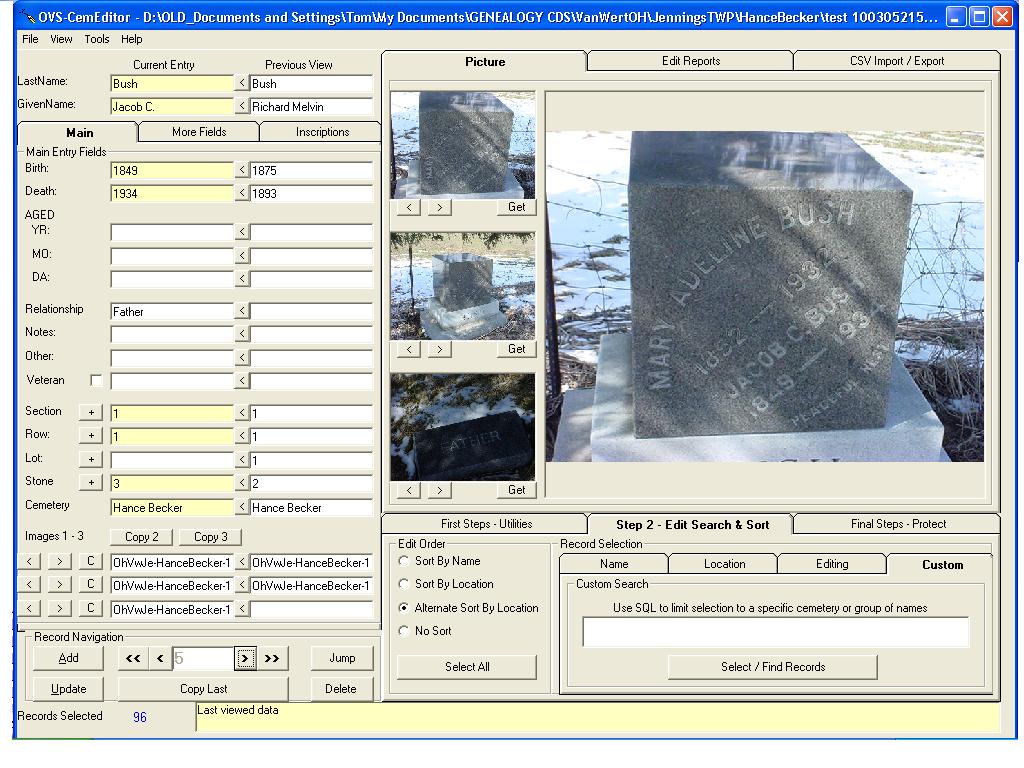
Screen shotsThe image below is smaller than the actual size of the screen, for a full sized view click here. 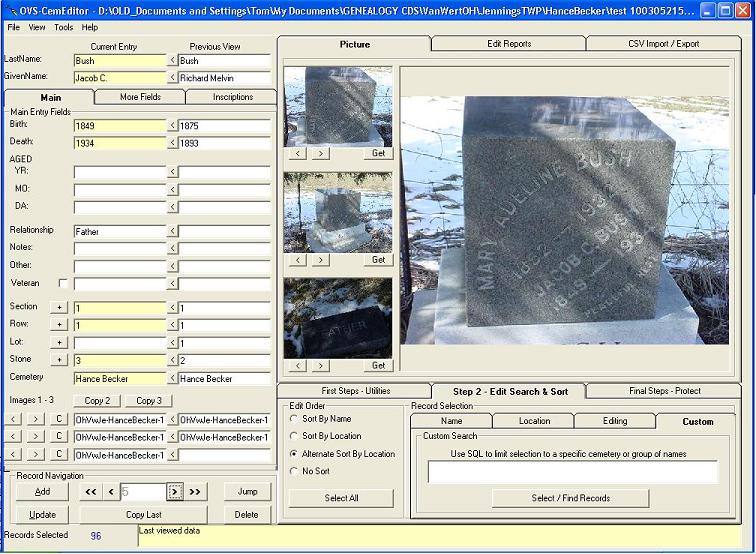
Requirements
|

 |
![[Valid RSS]](http://www.ovs-genealogy.com/images/valid-rss.png "Validate my RSS feed")
|
Copyright 2004-2026 OVS-GENEALOGY OVS TAG
Contact: support@ovs-genealogy.com
To receive replies make sure to allow email from this address in your email filter
www.ovs-genealogy.com