|
[an error occurred while processing this directive]
|
Help
Cemetery Information
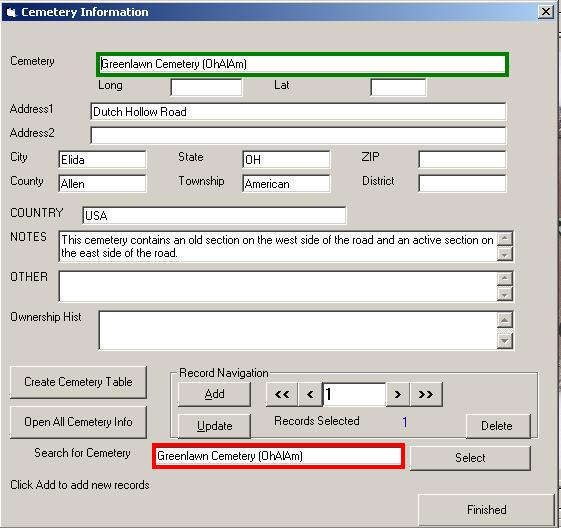
Screenshot of previous version is here.
Cemetery Information Screenshot
After double-clicking on the cemetery field in
the main editor the following screen will appear:
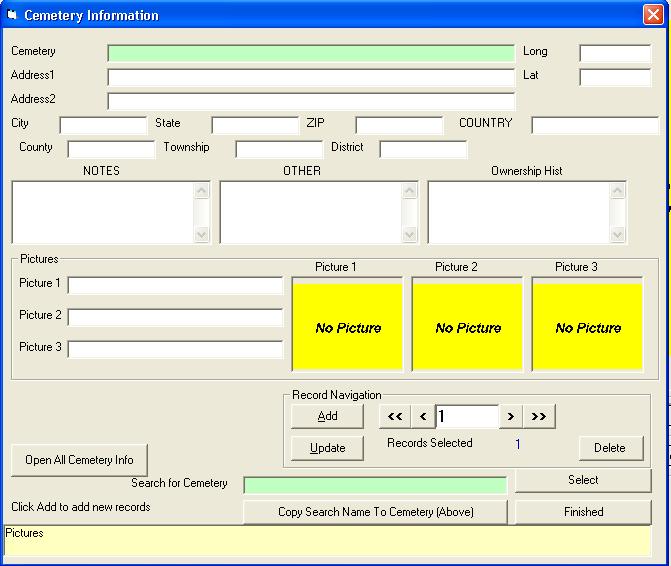
Cemetery Information Entry Fields Help
The "Search For Cemetery" (outlined in red,
same as cemetery field in the Editor) and the
"Cemetery" field (outlined in green) should be
the same.
- If the "Cemetery" field is blank then copy
the information from the "Search For Cemetery"
field to the "Cemetery" field. This will be
automated in a future version.
- If the "Cemetery" field does not match then
click on "ADD" then copy the information from the
"Search For Cemetery" field to the "Cemetery"
field, then continue to enter your information.
This will be automated in a future version.
Information for multiple cemeteries can be
entered. The information that is entered into the
CemEditor's "Cemetery" field must match exactly
to the "Cemetery" field above.
Field Sizes
|
Field
|
Characters
|
Comment
|
|
Cemetery
|
100
|
Enter Cemetery Name (If entering multiple
cemeteries make sure each name is unique.)
|
Address1
Address2
|
40
|
Enter Address information.
|
|
City
|
30
|
Enter name of village, town or city.
|
State
County
Township
District
|
25
|
Enter other local information.
|
|
Country
|
50
|
Enter country.
|
|
Zip
|
10
|
Enter postal code.
|
Lat
Long
|
15
|
Enter latitude and longitude.
|
|
Notes
|
255
|
Enter notes including driving directions,
date of survey etc...
|
|
Other Notes
|
255
|
Enter other notes -- condition of cemetery
active etc....
|
|
Ownership Hist
|
255
|
Enter brief ownership history.
|
Picture 1
Picture 2
Picture 3
|
50
|
Photos must be in the ALSPWO folder or a sub
directory of that folder.
|
|
|