| [an error occurred while processing this directive] |
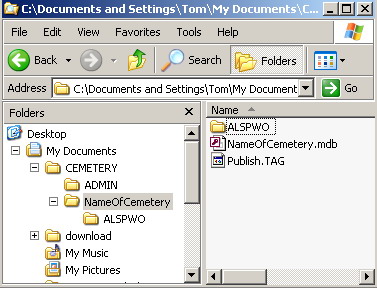
HelpEditing - File Location and PlacementThe CemEditor and CemViewer are dependent on files being in the right locations for the database and viewers to work correctly. If you have a cemetery named "NameOfCemetery" that you are transcribing then you will want to make a folder and name it "NameOfCemetery". You will then open the "NameOfCemetery" Folder and Create another new folder named "ALSPWO". The "ALSPWO" can be created directly using the ALSPWO "Select Image File" dialog by double-clicking on one of the image fields Your pictures are then copied to this folder either now or later, but before entering them. When the editor is open you simply type in the first picture name and it should open in the Editor Screen. Images can also be selected by double-clicking on any of the image fields. If you want to put pictures in sub-folders of the "ALSPWO: folder you can, but you will need to enter the sub-folder and picture name in the Cem-Viewer. The database file with the extension ".mdb" the "ALSPWO" folder needs to be in the same folder as the ".mdb" file. See screen shot:
Example: When you encrypt the files they will end up with a .enc as the file name extension. The CemViewer looks for a .enc picture file. The CemEditor looks for the filename you type in. Folder & Directory Structure: My Documents (Folder) --CEMETERY (Folder) ------HornCemetery (Folder) -------------FILE: HornCemetery.mdb (File) --------------ALSPWO (Folder) --------------------pic1.jpg (File) --------------------pic2.jpg (File) --------------------etc... See the example on the cd -- it is helpful to showing where the files need to be. It might even help to copy the example directly to your hard drive to work on it. If you want picture sub folder of ALSPWO then enter the sub folder name and the picture name. No sub folder (Pictures are in ALSPWO/Picture1.jpg) CemEditor Image Field: Picture1.jpg With Sub Folder (Pictures are in ALSPWO/Cemetery1/Picture1.jpg) CemEditor Image Field: Cemetery1/Picture1.jpg Type the exact name of the file in the Image / Picture fields (Not the whole filename) |